Ec Online Tamilnadu
Welcome, all! Ec Online Tamilnadu, Ec View, Guideline Value (Tnreginet) @ tnreginet.gov.in I share complete all information related tnreginet.gov.in.
TNREGINET was launched by the Government of Tamil Nadu under the Inspector General of Registration Department. This portal is specially made for Tamil Nadu residents who need property registration, EC certificates, guideline value checking, stamp duty payment and document verification services. The main purpose is to eliminate physical visits to government offices and provide transparent, efficient property-related services online. Under this program, eligible users can get benefits like instant EC download, online stamp duty payment, and property registration from home. The portal was developed by Tata Consultancy Services (TCS) and handles everything digitally. Till now, thousands of people have registered and used these services. The registration process is completely online and free. You can apply from home using mobile or computer. Let me explain everything step by step.
Quick Overview Ec Online
| Feature | Details |
|---|---|
| Portal Name | TNREGINET (Tamil Nadu Registration and Stamps Department) |
| Launched By | Government of Tamil Nadu |
| Developed By | Tata Consultancy Services (TCS) |
| Beneficiaries | Tamil Nadu Residents |
| Main Services | EC View, Guideline Value, Property Registration, Certificates |
| Registration Fee | Free |
| Official Website | https://tnreginet.gov.in/portal/ |
| Helpline | 044-24640160 |
What is TNREGINET Portal?
TNREGINET stands for Tamil Nadu Registration and Stamps Department Internet Portal. This is your one-stop digital solution for all property-related work in Tamil Nadu. Think of it as bringing the registration office to your computer or mobile phone. The platform was created to make your life easier when dealing with property transactions, document verification, and official certificates.
The portal handles everything from registering your property documents to checking if a property has any legal issues. You don’t need to stand in long queues anymore or take multiple trips to government offices. Just log in from home, and you’re good to go. The system is designed keeping common people in mind, so even if you’re not very tech-savvy, you’ll find it simple to use.
EC View Online Process
The Encumbrance Certificate (EC) is super important when you’re buying or selling property. It basically tells you if the property is clean — meaning no loans, no legal cases, nothing hanging over it. TNREGINET makes getting this certificate really easy and quick.
To view and download EC online, follow these steps:
- Visit the official website at tnreginet.gov.in
- Log in using your registered username and password.
- Look for the E-Services section and click on Encumbrance Certificate option.
- Choose your search type — you can search by EC, document-wise, or plot/flat-wise.
- Enter the required property details like zone, district, and Sub-Registrar Office name.
- Fill in the EC start and end dates, village name, and survey number.
- Type the captcha code shown on screen to verify you’re human.
- Click the Search button and wait few seconds.
- Your EC will appear on the screen — you can view all details.
- Download the certificate as PDF file for free.
- Save it on your device or take a printout for your records.
The best part? You get the EC instantly. No waiting for days or weeks like the old system. The certificate shows all transactions for your chosen time period, usually up to 30 years of property history.
Guideline Value Check Process
Guideline value is the minimum price set by the government for property registration. You need this to calculate your stamp duty and registration fees. TNREGINET makes checking this value super simple, and you don’t even need to log in for this service.
Steps to check guideline value:
- Go to tnreginet.gov.in from any browser.
- On the homepage, find and click on Guideline Value option.
- Select the valuation date from the dropdown menu.
- Choose the date range that applies to your transaction.
- Enter your property location details carefully.
- Type the street name exactly as it appears in records.
- Enter the village name where property is located.
- Add any additional details like land classification if asked.
- Double-check all information before proceeding.
- Click on Search button to get results.
- The portal will show you the guideline value for that area.
- You’ll also see contact details of the relevant Sub-Registrar Office.
- Note down the value for your stamp duty calculation.
You can take a screenshot or print the page for reference. The guideline values are revised periodically by the government. The last major revision happened on July 1, 2024, so make sure you’re checking the current applicable rates.
TNREGINET Registration Process
Before you can use most services on TNREGINET, you need to create an account. Don’t worry, the registration process is straightforward and takes just few minutes.
Step 1: Visit the Website
Open the official portal at tnreginet.gov.in
Step 2: Choose Registration Option
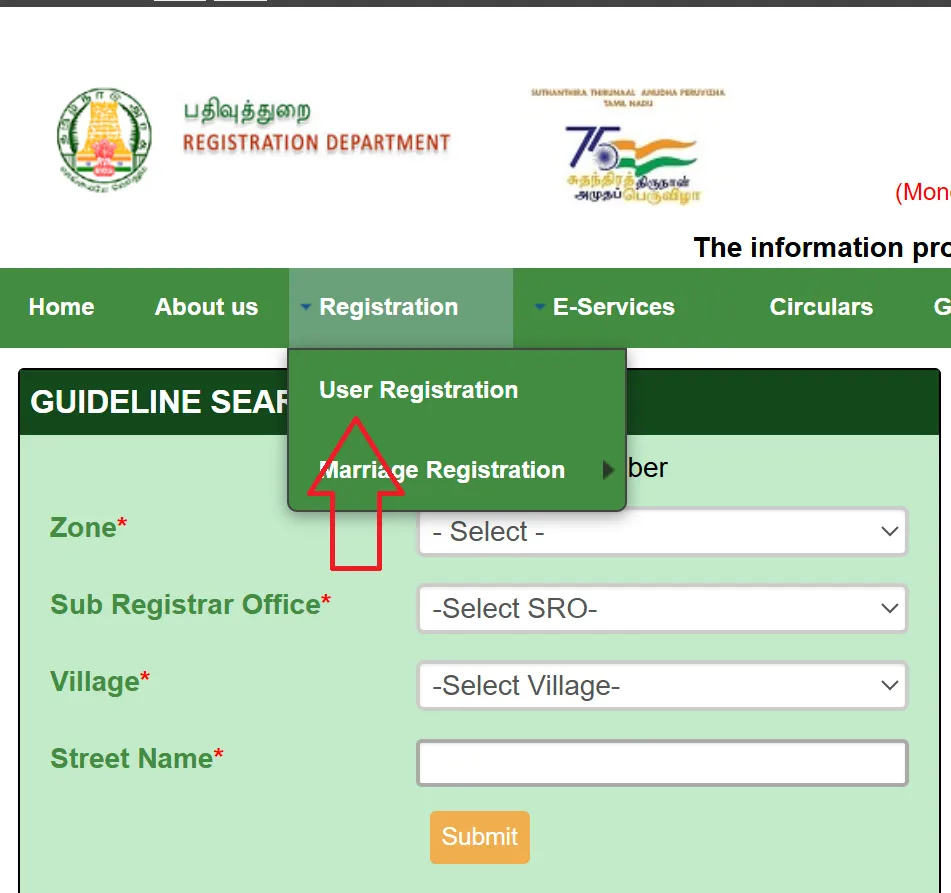
Look at the top-right corner and click on Registration. From the dropdown menu, select User Registration.
Step 3: Select User Type
Choose your user type from the options given: • Pick Citizen if you’re a regular individual • Select Document Writer or Advocate if you’re a professional
Step 4: Create Login Credentials
Create a unique username like TNUser2025 or any name you prefer. Set a strong password with letters, numbers, and special characters. Re-enter the same password to confirm it.
Step 5: Security Setup
Choose a security question from the list. Provide an answer you’ll remember for account recovery.
Step 6: Fill Personal Details
Enter the following information: • Salutation, first name, middle name, last name • Gender from the dropdown options • ID document type — Aadhaar, Voter ID, or Passport • ID document number carefully • Email address and confirm by typing again • Date of birth using the calendar tool • Mobile number (mandatory)
Step 7: Add Address Information
Fill in your address details: • State, district, pin code • Complete address as shown on your ID proof • If you’re a professional, add business address and license details
Step 8: Complete Verification
Enter the captcha code displayed on screen. Click Complete Registration button to submit. You’ll receive an OTP on your registered mobile number. Enter the OTP to verify and activate your account.
Once verified, you can log in anytime using your username and password. Remember to use the portal within 7 days of registration, otherwise your account might get deactivated.
Property Registration on TNREGINET
Registering property through TNREGINET is much faster than the traditional method. You can complete most of the process online and only visit the Sub-Registrar Office once for final verification.
Step 1: Prepare Documents
Collect all your important documents before starting: • Sale deed or draft deed document • ID proofs — Aadhaar, Voter ID, or Passport for both parties • PAN cards of buyer and seller • Encumbrance Certificate for the property • Patta/Chitta as proof of land ownership • Recent passport-size photographs • Thumb impression copies if required
Step 2: Login and Create Application
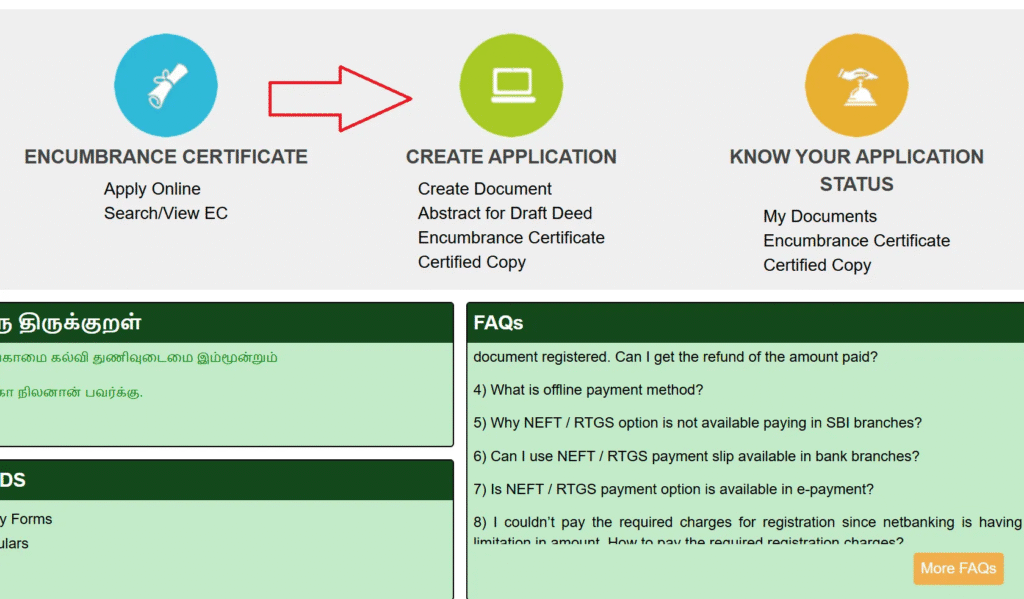
Log in to your TNREGINET account. Navigate to Application Creation section and click on Create Document option.
Step 3: Enter Document Details
Select the document type you want to register: • Sale deed, gift deed, mortgage, or others • Enter complete property details like location and survey number • Fill in information about buyer and seller • Upload scanned copies of all required documents in correct format
Step 4: Review and Generate Draft
Review all entered details very carefully. Generate the draft document after verification. Check the draft for any mistakes or missing info.
Step 5: Calculate and Pay Stamp Duty
Use the online calculator to determine stamp duty amount based on property value and document type. Pay the stamp duty and registration fees online using netbanking, UPI, or debit/credit card. Download the payment receipt immediately.
Step 6: Book Appointment
Book an appointment at your Sub-Registrar Office. Choose a convenient date and time slot.
Step 7: Visit SRO Office
On the appointment day, bring all original documents. Complete biometric verification with thumb impressions. The officer will verify all your documents.
Step 8: Get Registered Document
After successful verification, your registration is complete. You’ll receive confirmation on the portal. Download the registered document for future use.
The whole process is designed to save your time. You only need to visit the office once, and most paperwork happens online.
Documents Required
You need these documents based on the service:
For Property Registration: • Original sale deed or agreement document • Aadhaar card of buyer and seller both • PAN card copies mandatory for both parties • Voter ID or Passport as additional ID proof • Current Encumbrance Certificate of the property • Patta and Chitta land ownership records • Recent passport-size color photographs • Thumb impression copies on plain paper • Previous property documents if available • Bank loan NOC if property has mortgage
For EC Application: • Property survey number details • Village and district information • Sub-Registrar Office jurisdiction name • Time period for which you need EC • Property subdivision number if applicable
For Guideline Value Search: • Exact street name from property records • Village name where property is located • Land classification type if known
For Marriage Certificate: • ID proof of bride and groom • Date of birth proof for both • Residence proof showing Tamil Nadu address • Passport-size photographs of couple • Marriage invitation card or proof • Witness details with their ID proofs
Benefits of TNREGINET
This portal offers following benefits:
• Saves precious time — no more wasting entire days at government offices • No travel costs — complete most work from home in minutes • Paperless process — less hassle and better for environment • 24/7 availability — access services anytime, even at midnight or on holidays • Transparent system — see all charges clearly with no hidden fees • Instant updates — get SMS and email notifications automatically • Secure platform — documents and personal information protected with encryption • Easy to use — simple interface that even non-tech people can navigate • Reduces errors — online forms have validation checks • Fast processing — digital workflow means quicker approvals • Historical records — access old property documents anytime • Multiple services — one portal for property, certificates, and various government services
Services Offered by TNREGINET
Complete List of Available Services
TNREGINET services cover a wide range of registration and certification needs for Tamil Nadu residents:
- Property Registration
- Facilitates online submission of property documents, stamp duty payment, and appointment scheduling with Sub-Registrar Offices (SROs).
- Encumbrance Certificate (EC)
- Provides proof of a property’s legal and financial status, essential for property transactions.
- Guideline Value Search
- Helps determine stamp duty and registration fees based on government-set property values.
- Document Search and Download
- Access historical property records or certified copies of registered documents.
- Stamp Duty Payment
- Calculate and pay stamp duty online for various document registrations.
- Marriage, Birth, and Death Registration
- Apply for certificates without visiting government offices physically.
- Jurisdiction Search
- Identify the relevant Sub-Registrar Office (SRO) for a specific property.
- Building Value Calculation
- Estimate property value for registration purposes using government guidelines.
- Other Registrations
- Register firms, societies, chit funds, and other legal entities online.
Important Links
| Purpose | Link |
|---|---|
| Official TNREGINET Portal | Click Here |
| User Registration | Register Now |
| EC View Online | View EC |
| Guideline Value Check | Check Value |
| Helpdesk Email | helpdesk@tnreginet.net |
TNREGINET Helpdesk
Helpdesk Support
Phone: 044-24640160
Email: helpdesk@tnreginet.net
Hours:
Monday–Friday: 8 AM–8 PM
Saturday: 10 AM–5 PM
Note: Support available in Tamil and English
Conclusion
On this article, I have given the complete information about TNREGINET portal and I have also told EC view online process, guideline value checking method, and property registration steps in complete step-by-step format in this article post. If you liked this article then definitely share it with your friends and family so they can also benefit from this portal. You can also read other government schemes on our site like Tamil Nadu e-Services, Patta Chitta online, and other property-related services. If you have any questions or doubts, please comment below or contact helpline number 044-24640160. Thank you for visiting our article and best of luck for your registration!
Frequently Asked Questions (FAQs)
Can people from outside Tamil Nadu use TNREGINET services?
No, TNREGINET services are exclusively for Tamil Nadu residents only. The portal is designed specifically for properties and registrations within Tamil Nadu state boundaries.
Is there any charge for downloading Encumbrance Certificate?
Yes, there’s a nominal fee structure. Application costs ₹1, ₹30 for one year, ₹10 per additional year, and ₹100 for computerized records since 1987. However, viewing EC online is free.
How long does property registration take on TNREGINET?
Online document submission and verification take same day. You need one office visit for final verification. Complete registration usually finishes within 1-3 working days after office visit.
What if I forget my TNREGINET login password?
Click on Forgot Password option on login page. Answer your security question, and you’ll receive password reset link on registered email or mobile number. Create new password to regain access.
Can I apply for Patta Chitta records on TNREGINET?
No, Patta Chitta land records are not available on TNREGINET portal. You need to visit Tamil Nadu e-Services portal separately to access land record information and Patta Chitta details.
Is TNREGINET portal available in Tamil language?
Yes, the portal supports both English and Tamil languages. You can switch between languages using the language selector on the homepage for better understanding.